
Troubleshooting
Archive a campaign
Archiving a campaign replaces it with a brand-new copy. Advigator archives the old campaign on Amazon and immediately creates a new one in the same campaign group, with the same targeting and the same budget. You don’t lose any data: Advigator keeps targeting and bid data at product level, and the history of the old campaign stays in Analytics.
How to archive a campaign
- Go to Campaign groups and find the product.
- Next to Campaigns, click Edit. The Campaigns panel opens.
- On the row of the campaign to replace, click the archive icon (Archive this campaign).
- Confirm.
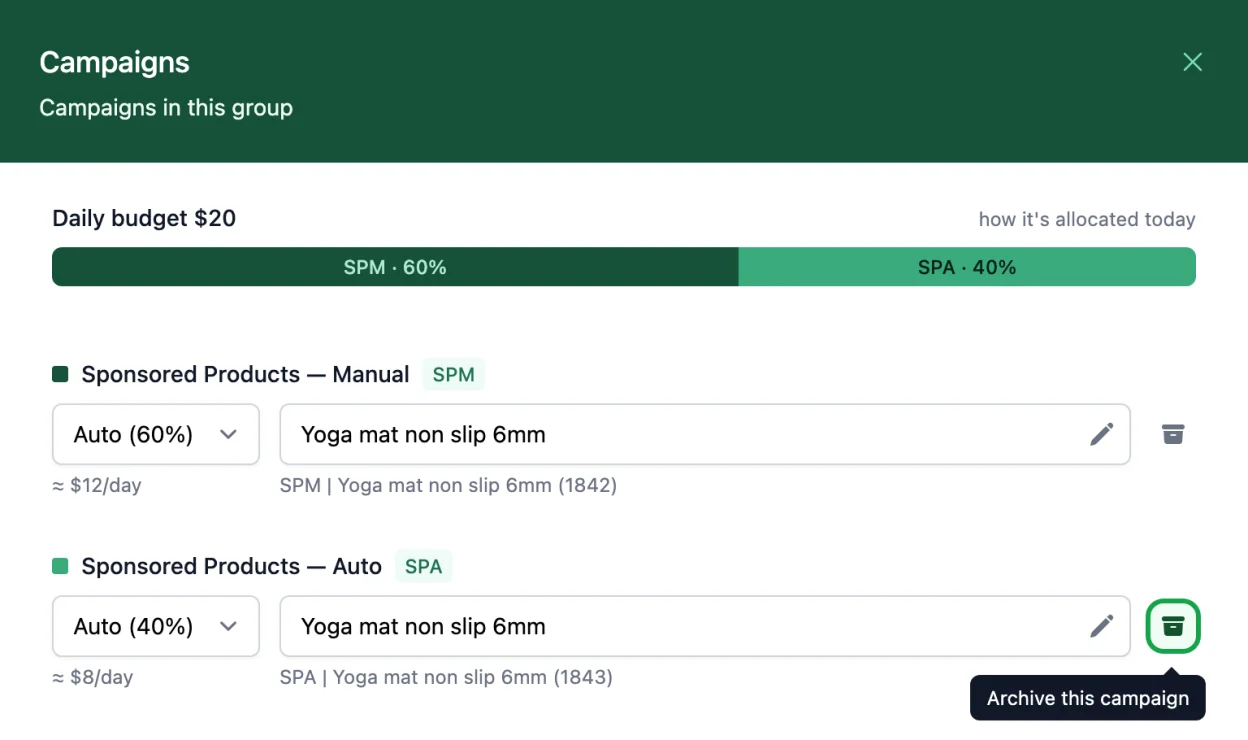
Advigator archives the campaign on Amazon and creates the new one right away, with the same targeting and budget share. In Amazon Ads console you’ll see the old campaign as archived and a new campaign with the same name and a new number in brackets, for example “SPA | Yoga mat non slip 6mm (1843)”.
Archive only the campaign you need to replace: the other campaigns of the group keep running as they are.
Your data is safe
Bids per click don’t start from zero. Advigator keeps the targeting and conversion data of your products and uses it to set the bids of the new campaign. The old campaign’s spend and sales stay in Analytics.
When to archive a campaign
You rarely need it. The main case is a campaign that has reached Amazon’s limit of 10,000 negatives. Amazon accepts at most 10,000 negatives in a single campaign, and negative keywords and negative product pages (ASINs) count together.
Negatives by category or title fill the limit fast
In Negative product pages you can exclude a whole Category or every product whose Title contains a word. Advigator turns each of these into a list of ASINs and adds every ASIN as a separate negative in the campaign. A single category can add hundreds of ASINs, so a few categories or title words are enough to reach 10,000.
Negatives you removed still count
When you remove a negative in Advigator > Targeting > Negative targeting, Advigator removes it from your campaign on Amazon too, and the negative stops blocking traffic straight away. But Amazon doesn’t delete it: it keeps it in the campaign as archived, and archived negatives still count towards the 10,000. Nobody can delete them, neither you nor Advigator, because Amazon doesn’t allow it.
So removing negatives doesn’t free any space. If you added a category and then removed it, its hundreds of ASINs stay in the count as archived. You might see only 50 active negatives in Advigator while Amazon counts 10,000.
How Amazon counts the negatives of one campaign
- Active: the negatives you see in Advigator > Targeting > Negative targeting. They block traffic.
- Archived: negatives you removed in the past, such as the ASINs of a category you no longer exclude. They no longer block anything, but Amazon still counts them.
- ×New negatives: no room left, so Amazon rejects them.
How to recognize it
In Amazon Ads console, a campaign of the group doesn’t contain all the negatives you added in Advigator > Targeting > Negative targeting. It can happen in any campaign.
The negatives already in the campaign keep working. Only the new ones are missing, because there is no room left for them.
Why archiving fixes it
The only way to free the space is to start from an empty campaign. When you archive the full campaign, Advigator creates a new one and adds only the negatives you currently have in Advigator > Targeting > Negative targeting. The old archived negatives stay behind in the old campaign, and the new campaign starts with the full 10,000 available.
Before archiving, review your negatives: remove the ones you no longer need, and keep only the categories and title words that really matter, so the new campaign doesn’t fill up again. See Negative targeting.
Other case: a product reinstated by Amazon
If Amazon suspended your product for a policy violation and later reinstated it, but the campaign still doesn’t deliver, archiving the campaign also helps.
Did you archive a campaign by mistake in Amazon Ads console?
Make any change in the campaign group (for example, turn it off and on again). At the next sync, Advigator sees that the campaign is archived and creates a new one automatically.
To archive products you no longer sell, see Archive obsolete products.