
问题排查
找不到 Sponsored Brands
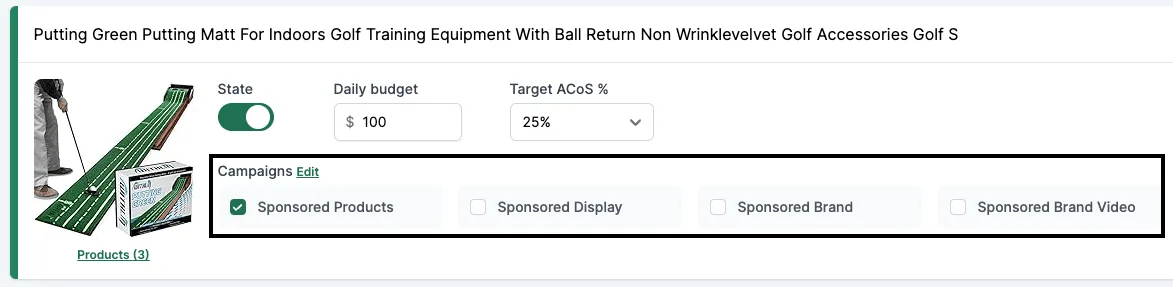
如果你看不到这些复选框,是因为 Brand Registry 存在某些问题。即使你过去已经投放过 SD 或 SB 广告活动,也可能出现这种情况。原因可能有多个,请逐一排查。
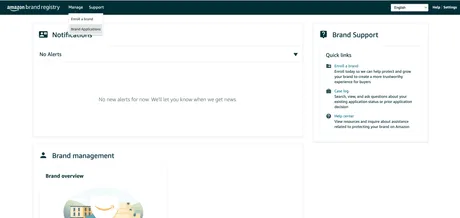
原因一:Brand Registry 存在问题
- 前往 https://brandregistry.amazon.com。
- 确认状态为“Registered”,且没有任何警告。
- 如果发现问题,请联系 Seller Central 支持,并选择“Brand registry”。
原因二:缺少 LBR node
另一种情况是可能缺少 LBR node。
- 前往 https://advertising.amazon.com/contactus。
- 提交一个工单,内容如下:
I’m a seller with a registered brand in Brand registry; however, I am not able to get my brand through GET /brands. The root cause is that the brand is missing a LBR node, please help create a LBR node for this brand.
- Brand name: [REPLACE]
- ASIN URL / External Product URL (with brand on the product or packaging): [REPLACE]
- Marketplace: [REPLACE]
- Brand Website URL: [REPLACE]
- Registered Trademark ID: [REPLACE]
- Registered Trademark certificate file: [PDF ATTACHED]
联系我们的支持
如果你仍未解决问题,请联系我们的支持并附上:
- Brand registry 面板的截图,其中所有品牌都处于“Registered”状态。
- Seller Central 中已开工单的截图,显示你的问题以及 Amazon 的回复。
- Brand name: [REPLACE]
- ASIN URL / External Product URL (with brand on the product or packaging): [REPLACE]
- Brand Website URL: [REPLACE]
- Registered Trademark ID: [REPLACE]
- Registered Trademark certificate file: [PDF ATTACHED]
我们会向 Amazon Ads 支持另开一个工单,这可能需要几周时间。